How Channels Works
This document is written to give you insights into how Neuro's industry-leading channel integration software's order, Inventory, and Product syncing features work in the background.
Last updated 10 months ago

From Channel to Synced
Neuro’s End‑to‑End Flows for Orders, Stock, Fulfilment, Plugins, and Webhooks.
Welcome to the grand tour of Neuro’s order and inventory symphony: a brisk, clockwork overview of how orders pirouette from sales channels into Neuro, how stock levels keep their composure, and how fulfilments waltz back out - whether orchestrated directly, via plugins, or by trusty webhooks.
This page maps the flows end‑to‑end: order import cadence, fulfilment creation and confirmation, plugin‑driven lifecycles, webhook eventing, and the twin pillars of product data: Inbound Products and Inbound Inventory: so your channels stay impeccably synced, on time, and unflappably accurate.

Channels Flow
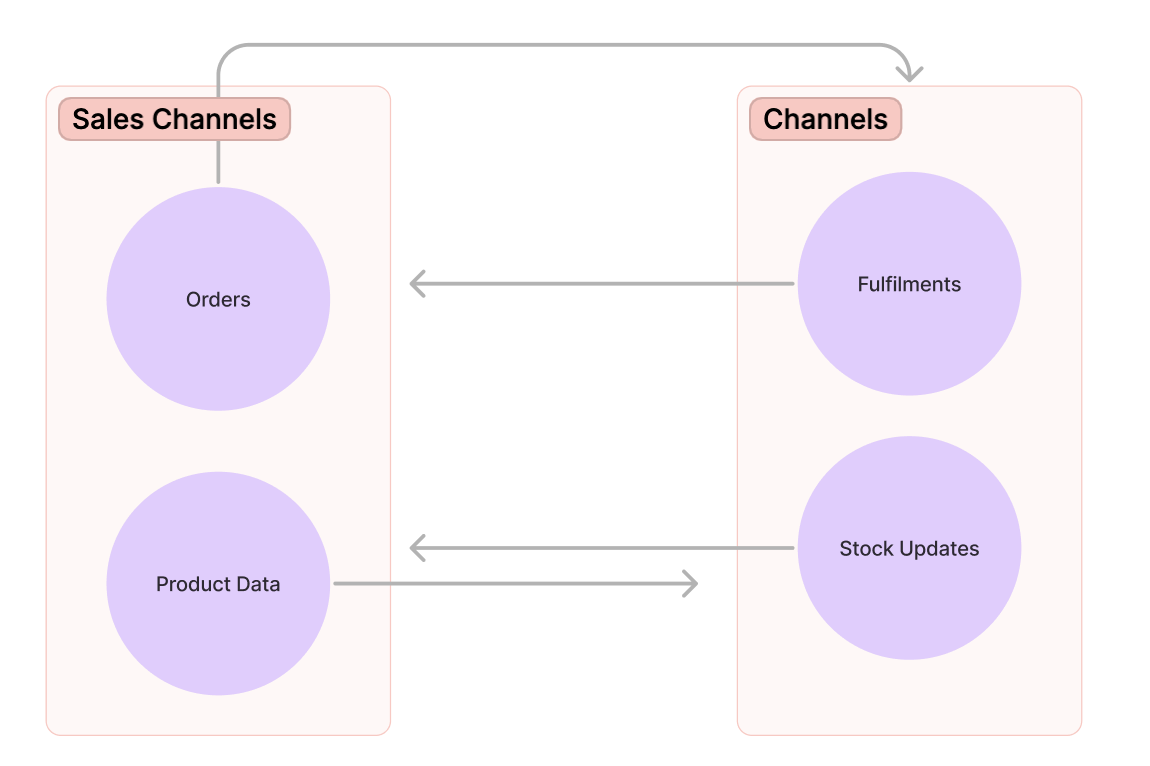
Neuro imports orders and product data from integrated sales channels. It also sends any fulfilment data and stock updates that might have occurred back to the sales channel that the orders were imported from. This allows you to seamlessly manage all your products from one place, ensuring that the stock levels of a product you're selling on different marketplaces to always be synchronised, preventing problems like overselling.

1. Order Flow

The order lifecycle involves several key steps from the moment an order is created until it is processed and updated in Neuro.
Steps for Order Processing:
Order Creation & Processing:
The order is created and processed on the sales channel.
Order Import:
The sales channel sends the order data to Neuro for processing.
Order Frequency:
Orders and order updates are imported into Neuro every 3 minutes by default.
Paid & Unfulfilled Orders:
Neuro imports only paid and unfulfilled orders. If you want to import other types of orders, you can enable that setting on a per-channel basis.
Stock Level Update:
Neuro updates the stock levels based on the items in the imported order.
Data Syncing:
The updated stock information is sent back to the sales channel to ensure inventory levels remain accurate.
For more details on this process, check out our Order Integration Guide.

2. Order Fulfilment Flow

The fulfilment process involves creating fulfilment data and synchronising it between Neuro and your sales channels.
Steps for Fulfilment:
Create Fulfilment:
Fulfilment data is created through an API call when an order is ready to be shipped.
Fulfilment Processing:
Neuro processes the fulfilment data for the order.
Send Fulfilment Data to Sales Channel:
Neuro sends the fulfilment data to the sales channel where the order originated.
Confirmation:
The sales channel confirms receipt and updates the order status to "Synced" once fulfilment is confirmed.
For more on fulfilment setup, refer to our Order Confirmation Guide.

3. Plugin Flow:
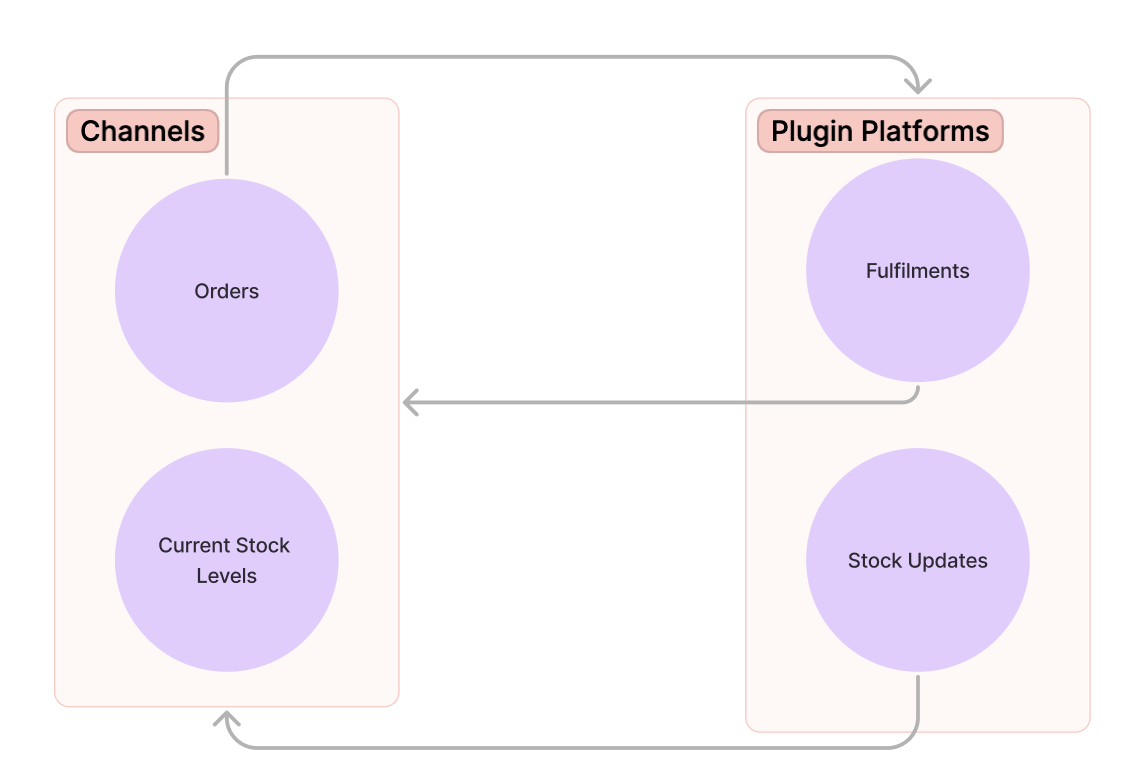
Channels allows you to integrate third-party plugins, such as fulfilment centres, to manage order fulfilments and stock updates. These plugins interact directly with Neuro to process orders and stock updates.
Steps for Plugin Integration:
Order Import:
Orders from your sales channels are imported into Neuro.
Send to Plugin:
Neuro sends the order to your chosen plugin for fulfilment processing.
Stock Update & Fulfilment:
The plugin processes the order, updates stock levels, and sends the fulfilment data back to Neuro.
Data Sync:
Neuro synchronises the updated stock levels and fulfilment details with the sales channel.
Refer to our Plugin Integration Guide for further details on plugin setup.

4. Plugin Order Flow

When orders are processed through plugins, the order lifecycle follows a distinct path.
Steps for Plugin Order Processing:
Order Creation:
An order is created in a sales channel.
Order Transfer:
Neuro imports the order and transfers it directly to the plugin.
Fulfilment by Plugin:
The plugin platform processes and fulfils the order, adjusting stock levels as necessary.
Return Fulfilment Data & Stock Update:
The plugin sends the updated stock levels and fulfilment data back to Neuro.
Data Sync with Sales Channel:
Neuro sends the updated information back to the sales channel to update the order status and stock levels.
For more on Plugin Order Flow, see our Plugin Documentation.

5. Plugin Fulfilment Flow

The fulfilment lifecycle for orders handled by plugins is straightforward, involving the creation of fulfilment data and its synchronisation with the sales channel.
Steps for Plugin Fulfilment Processing:
Create Fulfilment Data:
When the plugin fulfils the order, it creates fulfilment data on the plugin platform.
Send Fulfilment Data to Neuro:
The plugin sends the fulfilment data to Neuro.
Sync Data with Sales Channel:
Neuro sends the fulfilment data to the sales channel, marking the order status as "Synced" once the data is confirmed.

6. Webhook Flow
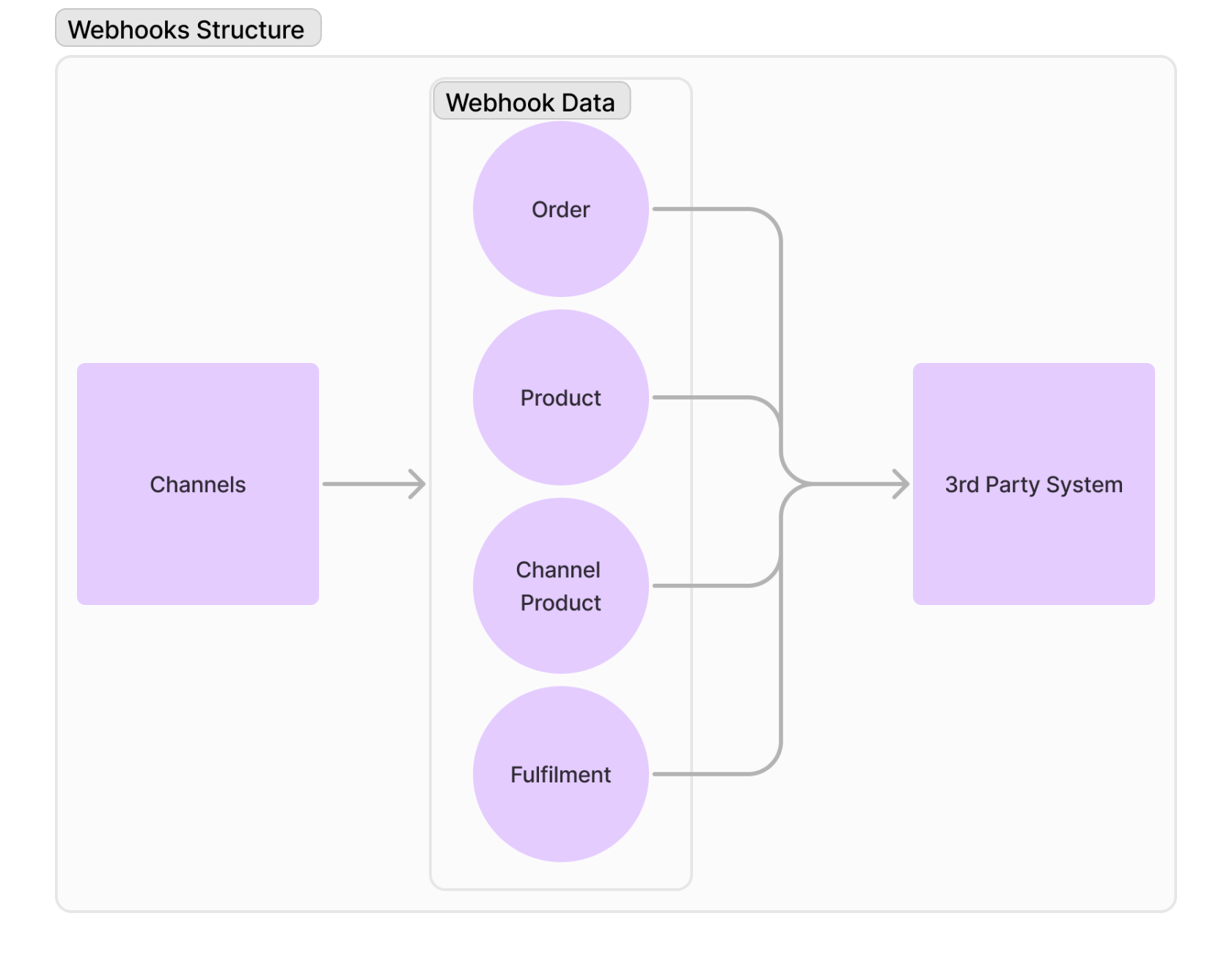
Webhooks enable Neuro to send data updates to your sales channels or third-party systems. This flow ensures your data remains up-to-date across platforms by transmitting order, product, and stock information as events occur.
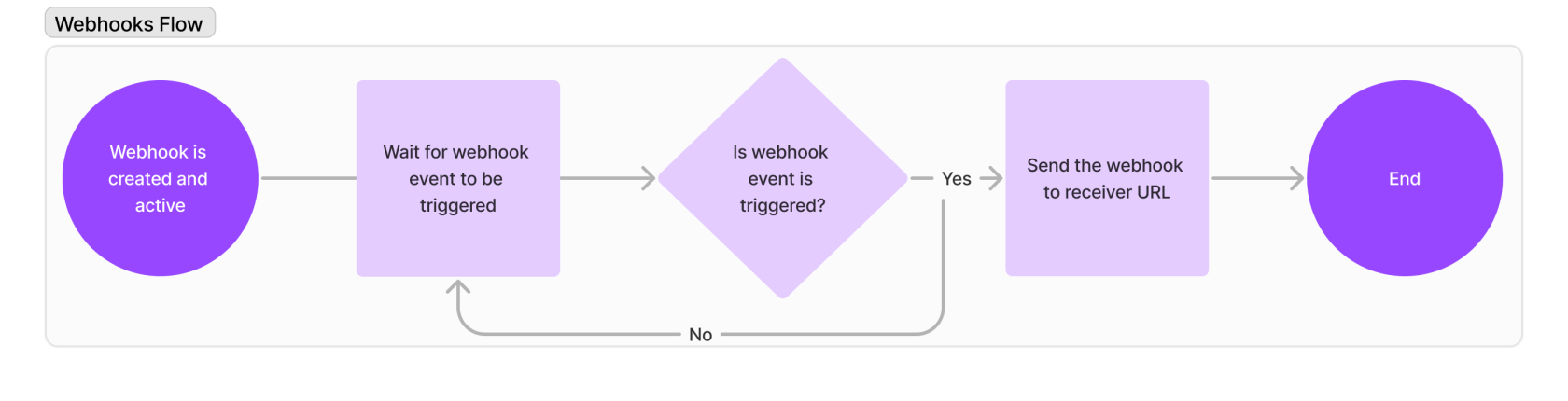
Steps for Webhook Integration:
Webhook Creation:
A webhook is created for a specific store.
Trigger Events:
Neuro triggers webhooks based on certain events, such as:
Created
Updated
Excluded
On Hold
Data Transmission:
When an event occurs, the webhook transmits relevant data (e.g., order updates, stock changes) to the designated receiver URL.
Receiver URL:
This receiver URL could be a third-party system, such as a warehouse management system (WMS) or order management system (OMS), including Despatch Cloud’s suite of products like Orders, Shipping, and Fulfilment.
For more information, refer to our Webhook Documentation.

7. Product Data Flow
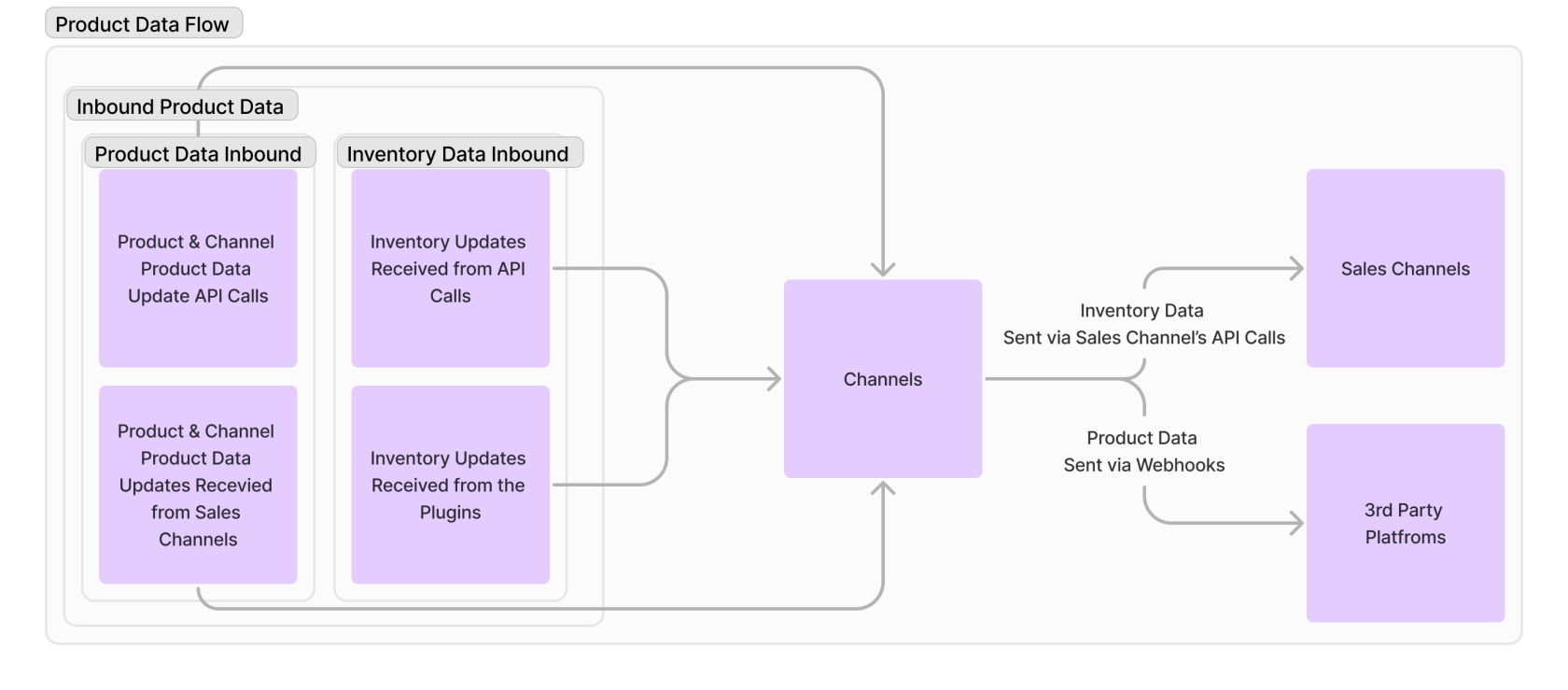
Neuro manages two distinct sets of product data: Inbound Products and Inbound Inventory. These datasets ensure that product and inventory information is accurately imported and synchronized.
Steps for Product Data Management:
Inbound Product Data:
Neuro stores two categories of product data:
Product Data: Includes the product SKU.
Channel Product Data: Includes SKU, product image, price, dimensions, weight, and customs info.
Inbound Inventory Data:
Inventory data is imported from APIs and plugins, with separate quantity data for each source (API and plugin).
Syncing Data:
Neuro sends the total product quantity and updates to sales channels or third-party platforms whenever inventory or product details change.
For more details on product and inventory management, refer to our Product Data Management Guide.

Next Steps & Support
By following these steps, you can ensure smooth and efficient order processing, stock synchronisation, and fulfilment management across all your integrated sales channels. For more in-depth information, please consult the respective setup and integration guides provided throughout this documentation.
Need help? Explore more of our documentation, or contact support.